

Video and Audio
Captions and transcripts are necessary tools for deaf and hard of hearing users to access content like video or podcasts.
Those who are blind rely on transcripts and audio description for information that is only presented visually in multimedia. Think of audio description like alt text but for videos.
Captions and transcripts also help those where English is a second language, in noisy environments or where having audio playing is difficult, and for those who process better in multiple modes among many others who benefit from accessibility.
Having audio content available as text also makes it accessible to machine translators, braille output devices (used by people who are deaf-blind), and other assistive technology.
Main considerations
- Captions are a text version of spoken audio and important sounds, synchronized with the video.
- Transcripts are a text version of spoken audio. Transcripts are usually provided alongside but separate from video/audio content. Transcripts can usually be read without having to watch the video. Transcripts can also provide a description of any information conveyed visually. This is useful especially for videos that contain no speech but only music and images.
- Audio description is a separate narrated track that provides more details about what is only presented visually.
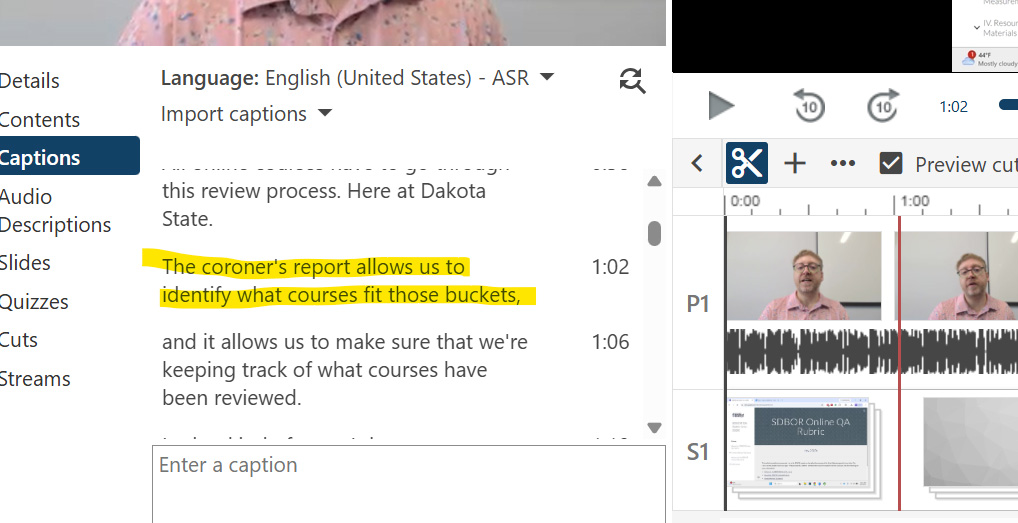
- Automatically generated captions or transcripts that aren't checked may contain inaccuracies. This is extra prevalent when using jargon or more complex words that automated systems will have a harder time with. In the screenshot below, the speaker spoke "Cognos report" and the automated captions came in as "coronoer's report," which entirely alters the context of the content for someone relying on those captions.
- Additionally, movement and sound can be extremely distracting for people with certain cognitive conditions. For some with neurological conditions it may even cause migraines, vertigo, or seizures. Rapid flashing can trigger seizures in people with certain neurological conditions. If these elements are unavoidable in your content, preface the video with a warning to any viewers so they have the option to avoid possible triggers.
| Content Type | Requirement | Implications |
|---|---|---|
| Pre-recorded video in an LMS | Must include accurate captions that meet WCAG 2.1 AA Standards |
|
| Pre-recorded video on a public website | Must include accurate captions that meet WCAG 2.1 AA Standards | Same as above |
| Live streaming video | Must provide real-time captions | Same as above |
| Audio descriptions | Required for video with essential visual information not conveyed in audio |
|
| Video Player Accessibility | Video players must be navigable with a keyboard and work with screen readers | |
| Virtual events | All virtual events must be accessible by default, which includes captions and platforms that support screen readers and other accessibility criteria | Accessible is the default expectation, not something that needs to be requested |
| Third-party content | Faculty, departments, etc, are responsible for ensuring third-party content used in instruction is accessible | More videos will need captions and audio descriptions will need creating |
Resources and Guidance
Use the following resources for guidance and assistance on acheiving accessibility for necessary content.
- Video content management accessibility strategy guide
- Creating post-production captions (From the National Deaf Center)
- DCMP Elements of quality captioning
- DCMP Caption it yourself
- Guidance on audio descriptions (Includes guidance for deciding when descriptions are neccessary)